
自定义下发类任务
自定义下发类任务
自定义下发类任务用来构造自定义数据,通过自定义数据流下发给设备。
提示
关于 自定义数据流 的详细介绍,请浏览 自定义数据流
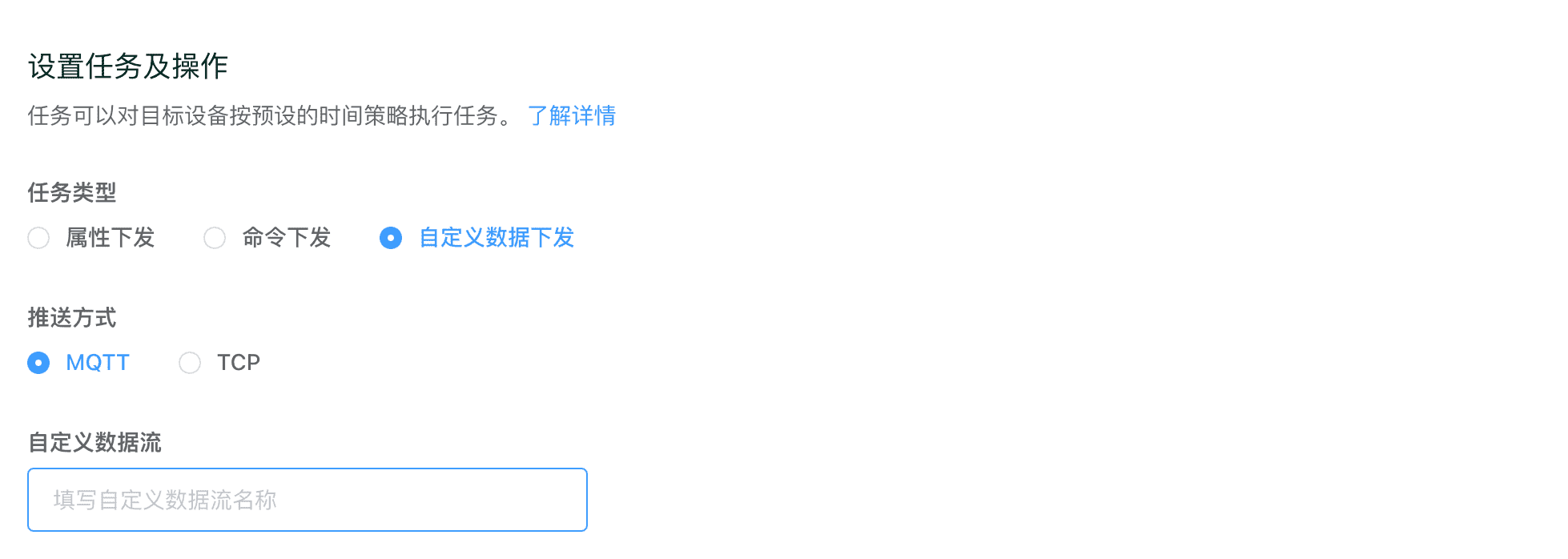
自定义下发推送方式
当使用自定义下发任务时,您需要指定下发推送方式:
- MQTT:用于设备通过 MQTT 接入自定义数据流。
- TCP:用于设备通过 TCP 接入自定义数据流。
如下图:
静态自定义下发
直接填写要下发的自定义数据,支持自定义数据流的几种数据格式。
例如,下发一个自定义的 JSON 格式消息:

例如,下发一个 Modbus RTU 查询消息:

云函数自定义下发
同样也支持通过云函数来实时构造要下发的自定义数据。如下图:
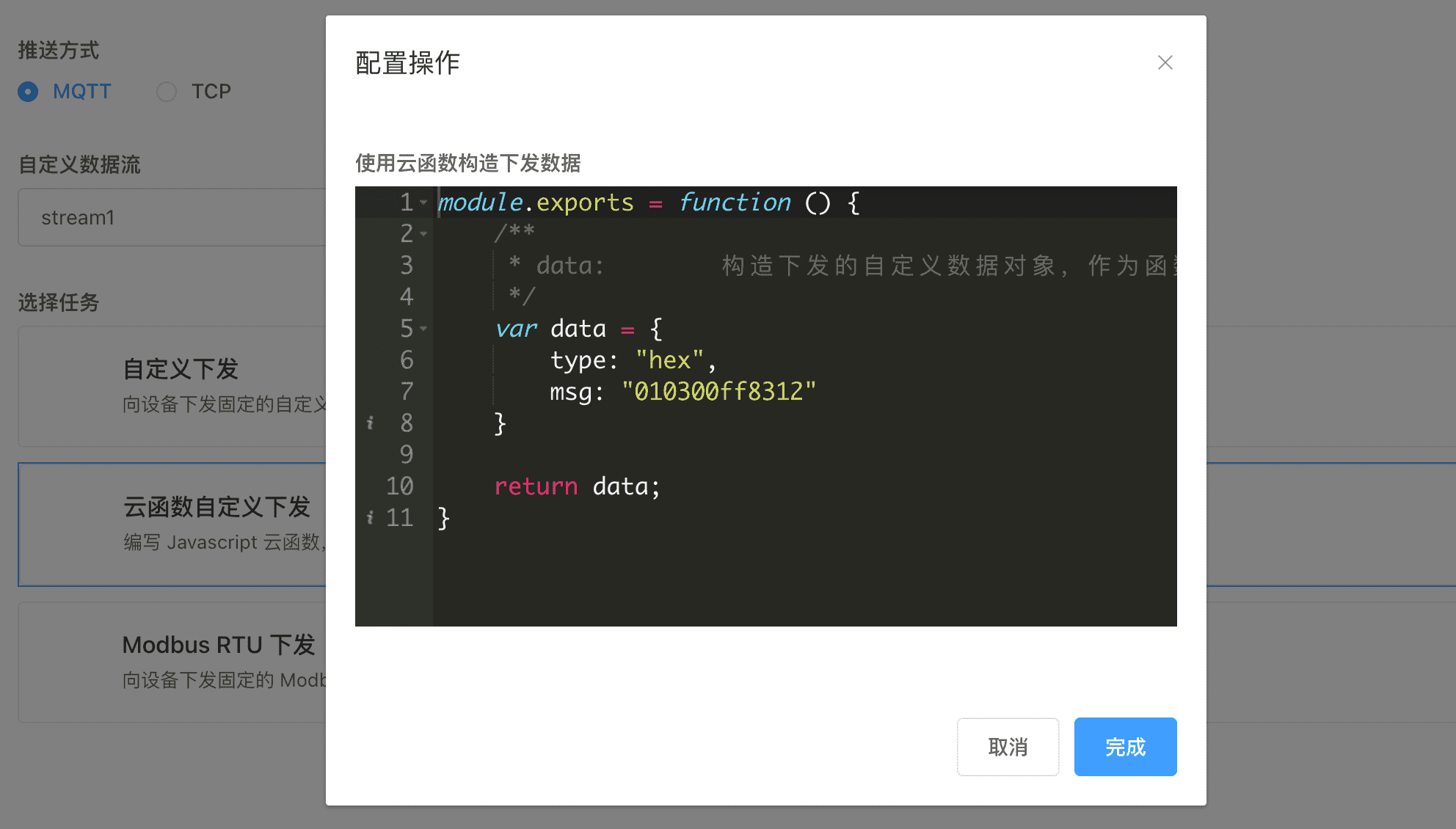
构造二进制数据
type:hexmsg:string类型,用十六进制字符串形式表示二进制消息。
例如:
module.exports = function () {

    var data = {
        type: "hex",
        msg: "010300ff8312"
    }

    return data;
}
示例:下发 Modbus RTU 查询消息
通过云函数动态生成 Modbus RTU 查询指令,查询温湿度传感器的数据。
module.exports = function () {
    /**
     * data:        构造下发的自定义数据对象,作为函数返回值,下发到硬件。
     */

    // 设置 Modbus 从站地址为 1
    Cloud.ModbusRTU.setUnitId(1);

    // 读取温湿度传感器的保持寄存器(地址 0 开始,读取 2 个寄存器)
    // 假设地址 0 存储温度,地址 1 存储湿度
    var modbus_cmd = Cloud.ModbusRTU.readHoldingRegisters(0, 2);

    var data = {
        type: "hex",
        msg: modbus_cmd
    };

    return data;
};
示例:智能温控系统自动调节
定时执行任务,根据当前温度,自动下发 Modbus 指令控制空调设备,实现温度自动调节。
module.exports = function () {
    /**
     * data:        构造下发的自定义数据对象,作为函数返回值,下发到硬件。
     */

    // 获取设备当前属性
    const attributes = Cloud.getCurrentAttributes();
    const currentTemp = attributes.temperature || 25;
    const targetTemp = attributes.target_temperature || 26;

    // 设置 Modbus 从站地址
    Cloud.ModbusRTU.setUnitId(1);

    var modbus_cmd;

    // 温度控制逻辑
    if (currentTemp > targetTemp + 1) {
        // 温度过高,开启制冷
        // 写入寄存器地址 0,值为 1(开启制冷)
        modbus_cmd = Cloud.ModbusRTU.writeRegister(0, 1);
    } else if (currentTemp < targetTemp - 1) {
        // 温度过低,开启制热
        // 写入寄存器地址 0,值为 2(开启制热)
        modbus_cmd = Cloud.ModbusRTU.writeRegister(0, 2);
    } else {
        // 温度适宜,关闭空调
        // 写入寄存器地址 0,值为 0(关闭)
        modbus_cmd = Cloud.ModbusRTU.writeRegister(0, 0);
    }

    var data = {
        type: "hex",
        msg: modbus_cmd
    };

    return data;
};
示例:多设备批量控制
在定时任务中,根据时间表批量控制多个照明设备的开关状态。
module.exports = function () {
    /**
     * data:        构造下发的自定义数据对象,作为函数返回值,下发到硬件。
     */

    // 获取当前时间
    const currentHour = parseInt(Cloud.Utils.dateFormat("HH"));
    const currentMinute = parseInt(Cloud.Utils.dateFormat("mm"));
    const currentTime = currentHour * 60 + currentMinute; // 转换为分钟数

    // 根据时间确定控制策略
    var controlCommands = [];

    if (currentTime >= 420 && currentTime <= 480) {
        // 早上 7:00-8:00:开启走廊照明
        Cloud.ModbusRTU.setUnitId(1);
        controlCommands.push(Cloud.ModbusRTU.writeCoil(0, 1)); // 开启线圈0
        controlCommands.push(Cloud.ModbusRTU.writeCoil(1, 1)); // 开启线圈1
    } else if (currentTime >= 1200 && currentTime <= 1260) {
        // 中午 20:00-21:00:关闭所有照明
        Cloud.ModbusRTU.setUnitId(1);
        controlCommands.push(Cloud.ModbusRTU.writeCoils(0, [0, 0, 0])); // 关闭多个线圈
    } else if (currentTime >= 60 && currentTime <= 120) {
        // 凌晨 1:00-2:00:设置夜间模式亮度
        Cloud.ModbusRTU.setUnitId(2);
        // 写入多个保持寄存器,设置不同区域的亮度值
        controlCommands.push(Cloud.ModbusRTU.writeRegisters(0, [30, 20, 15])); // 亮度百分比
    }

    // 如果有控制指令,返回第一个指令
    if (controlCommands.length > 0) {
        var data = {
            type: "hex",
            msg: controlCommands[0]
        };
        return data;
    }

    // 没有控制指令时返回空对象
    return {};
};
示例:下发日期文字到 LED 控制器设备
某 LED 控制器设备通过 MQTT 接入 ThingsCloud,设备采用自有 HEX 协议,用于显示日期文字。
通过定时任务中,每天定时执行一次,构造当前日期的文字消息,下发到 LED 控制器设备。
module.exports = function () {
    /**
     * data:        构造下发的自定义数据对象,作为函数返回值,下发到硬件。
     */
    const weekdays = ["日", "一", "二", "三", "四", "五", "六"];
    const cur_weekday = weekdays[Cloud.Utils.dayOfWeek()];
    const cur_year = Cloud.Utils.dateFormat("YYYY");
    const cur_month = Cloud.Utils.dateFormat("MM");
    const cur_day = Cloud.Utils.dateFormat("DD");

    var data = {
        type: "hex",
        msg:
            "55 55" +
            "20 20 20 20 20 20" +
            Cloud.Utils.strToHex(cur_year) +
            "C4 EA" +
            Cloud.Utils.strToHex(cur_month) +
            "D4 C2" +
            Cloud.Utils.strToHex(cur_day) +
            "C8 D5" +
            "20" +
            "D0 C7 C6 DA" +
            Cloud.Utils.strToGBKHex(cur_weekday),
    };

    return data;
};
构造 JSON 数据
type:jsonmsg:object类型,表示JSON消息。
例如:
module.exports = function () {

    var data = {
        type: "json",
        msg: {
            "data": {
                "code": "2021",
                "params": {
                    "brightness": 10000
                }
            }
        }
    }

    return data;
}
示例:智能照明系统场景控制
在智慧园区或办公楼宇中,根据不同时间段自动切换照明场景,实现节能和舒适性的平衡。
module.exports = function () {
    // 获取当前时间
    const currentHour = parseInt(Cloud.Utils.dateFormat("HH"));

    var scene_config = {
        "scene": "normal",
        "brightness": 80,
        "zones": {
            "office": {"brightness": 90, "on": true},
            "corridor": {"brightness": 60, "on": true}
        }
    };

    // 根据时间调整场景
    if (currentHour >= 9 && currentHour <= 17) {
        scene_config.scene = "work";
        scene_config.brightness = 100;
        scene_config.zones.office.brightness = 100;
    } else if (currentHour >= 18 && currentHour <= 22) {
        scene_config.scene = "evening";
        scene_config.brightness = 60;
    } else {
        scene_config.scene = "night";
        scene_config.brightness = 30;
        scene_config.zones.corridor.brightness = 30;
    }

    return {
        type: "json",
        msg: scene_config
    };
};
示例:工业设备远程参数配置
在工业自动化系统中,远程配置PLC或控制器的运行参数,支持批量更新和实时生效。
module.exports = function () {
    // 获取设备当前属性
    const attributes = Cloud.getCurrentAttributes();
    const device_mode = attributes.mode || "auto";

    var config_params = {
        "device_id": Cloud.getDeviceInfo().id,
        "timestamp": Cloud.Utils.unixTimestamp(),
        "config": {
            "mode": device_mode,
            "parameters": {
                "speed": 1200,
                "temperature": 85
            }
        }
    };

    // 根据不同模式调整参数
    if (device_mode === "high_speed") {
        config_params.config.parameters.speed = 1800;
    } else if (device_mode === "energy_saving") {
        config_params.config.parameters.speed = 800;
    }

    return {
        type: "json",
        msg: config_params
    };
};
示例:农业环境监控系统
在智慧农业场景中,根据环境传感器数据自动调节灌溉、通风、光照等设备,优化作物生长环境。
module.exports = function () {
    // 获取当前环境数据
    const attributes = Cloud.getCurrentAttributes();
    const temperature = attributes.temperature || 25;
    const soil_moisture = attributes.soil_moisture || 50;

    var control_commands = {
        "greenhouse_id": Cloud.getDeviceInfo().device_key,
        "controls": {
            "irrigation": {"enabled": false},
            "ventilation": {"enabled": false},
            "heating": {"enabled": false}
        }
    };

    // 根据环境数据控制设备
    if (soil_moisture < 30) {
        control_commands.controls.irrigation.enabled = true;
    }

    if (temperature > 28) {
        control_commands.controls.ventilation.enabled = true;
    } else if (temperature < 18) {
        control_commands.controls.heating.enabled = true;
    }

    return {
        type: "json",
        msg: control_commands
    };
};
示例:智能安防系统联动控制
某设备厂商开发的智能安防设备,在智能建筑或园区安防系统中,根据检测到的事件自动触发多个安防设备的联动响应。
module.exports = function () {
    // 获取最近的安防事件
    const attributes = Cloud.getCurrentAttributes();
    const security_event = attributes.last_security_event || "normal";

    var security_response = {
        "system_id": Cloud.getDeviceInfo().id,
        "timestamp": Cloud.Utils.unixTimestamp(),
        "event": {"type": security_event},
        "response": {
            "cameras": [],
            "alarms": [],
            "lighting": []
        }
    };

    // 根据事件类型执行联动控制
    switch (security_event) {
        case "motion_detected":
            security_response.response.cameras = [
                {"action": "start_recording"}
            ];
            security_response.response.lighting = [
                {"brightness": 100}
            ];
            break;
        case "door_forced":
            security_response.response.alarms = [
                {"mode": "siren"}
            ];
            break;
        case "fire_detected":
            security_response.response.alarms = [
                {"mode": "continuous"}
            ];
            security_response.response.lighting = [
                {"action": "blink"}
            ];
            break;
        default:
            return null;
    }

    return {
        type: "json",
        msg: security_response
    };
};
构造 Plaintext 文本消息
type:textmsg:string类型,表示消息文本。
例如:
module.exports = function () {

    var data = {
        type: "text",
        msg: "control,relay1:0,relay2:1"
    }

    return data;
}
示例:智能灌溉系统控制
在智慧农业场景中,根据土壤湿度数据自动控制灌溉设备的开关和灌溉时长。
module.exports = function () {
    // 获取土壤湿度数据
    const attributes = Cloud.getCurrentAttributes();
    const soilMoisture = attributes.soil_moisture || 50;

    if (soilMoisture < 30) {
        return {
            type: "text",
            msg: "irrigation,start,zone1,duration:300"
        };
    } else if (soilMoisture > 80) {
        return {
            type: "text",
            msg: "irrigation,stop,zone1"
        };
    }

    return null;
};
示例:水产养殖环境调节
在水产养殖场景中,根据水温自动调节加热设备和增氧机,维持适宜的水体环境。
module.exports = function () {
    const attributes = Cloud.getCurrentAttributes();
    const waterTemp = attributes.water_temperature || 25;
    const dissolvedOxygen = attributes.dissolved_oxygen || 6;

    var command = "";

    if (waterTemp < 22) {
        command += "heater,on;";
    } else if (waterTemp > 28) {
        command += "heater,off;";
    }

    if (dissolvedOxygen < 5) {
        command += "aerator,high;";
    } else if (dissolvedOxygen > 8) {
        command += "aerator,low;";
    }

    return command ? {
        type: "text",
        msg: command.slice(0, -1) // 移除最后的分号
    } : null;
};
示例:温室大棚通风控制
在温室大棚场景中,根据温度和湿度数据自动控制通风系统,调节室内环境。
module.exports = function () {
    const attributes = Cloud.getCurrentAttributes();
    const temperature = attributes.temperature || 25;
    const humidity = attributes.humidity || 60;
    const windSpeed = attributes.wind_speed || 0;

    var ventilationLevel = 0;

    if (temperature > 30) {
        ventilationLevel = 3; // 高速通风
    } else if (temperature > 26 || humidity > 75) {
        ventilationLevel = 2; // 中速通风
    } else if (temperature < 18 && windSpeed < 3) {
        ventilationLevel = 1; // 低速通风
    }

    return ventilationLevel > 0 ? {
        type: "text",
        msg: `ventilation,level:${ventilationLevel}`
    } : null;
};
示例:畜牧养殖饲料投喂
在畜牧养殖场景中,根据时间和动物生长阶段自动控制饲料投喂量和投喂频率。
module.exports = function () {
    const currentHour = parseInt(Cloud.Utils.dateFormat("HH"));
    const attributes = Cloud.getCurrentAttributes();
    const growthStage = attributes.growth_stage || "growth";

    var feedCommand = "";

    // 根据生长阶段确定投喂量
    var feedAmount = growthStage === "starter" ? 200 :
                    growthStage === "growth" ? 350 : 400;

    // 根据时间确定是否投喂
    if ((currentHour >= 7 && currentHour <= 8) ||
        (currentHour >= 17 && currentHour <= 18)) {
        feedCommand = `feeding,start,amount:${feedAmount}`;
    }

    return feedCommand ? {
        type: "text",
        msg: feedCommand
    } : null;
};
Modbus RTU 下发
针对 Modbus RTU 协议快速生成下发消息,支持功能码包括:
0x01:读取线圈状态0x02:读取输入状态0x03:读取保持寄存器0x04:读取输入寄存器0x05:写入单个线圈寄存器0x06:写入单个保持寄存器0x10:写入多个保持寄存器
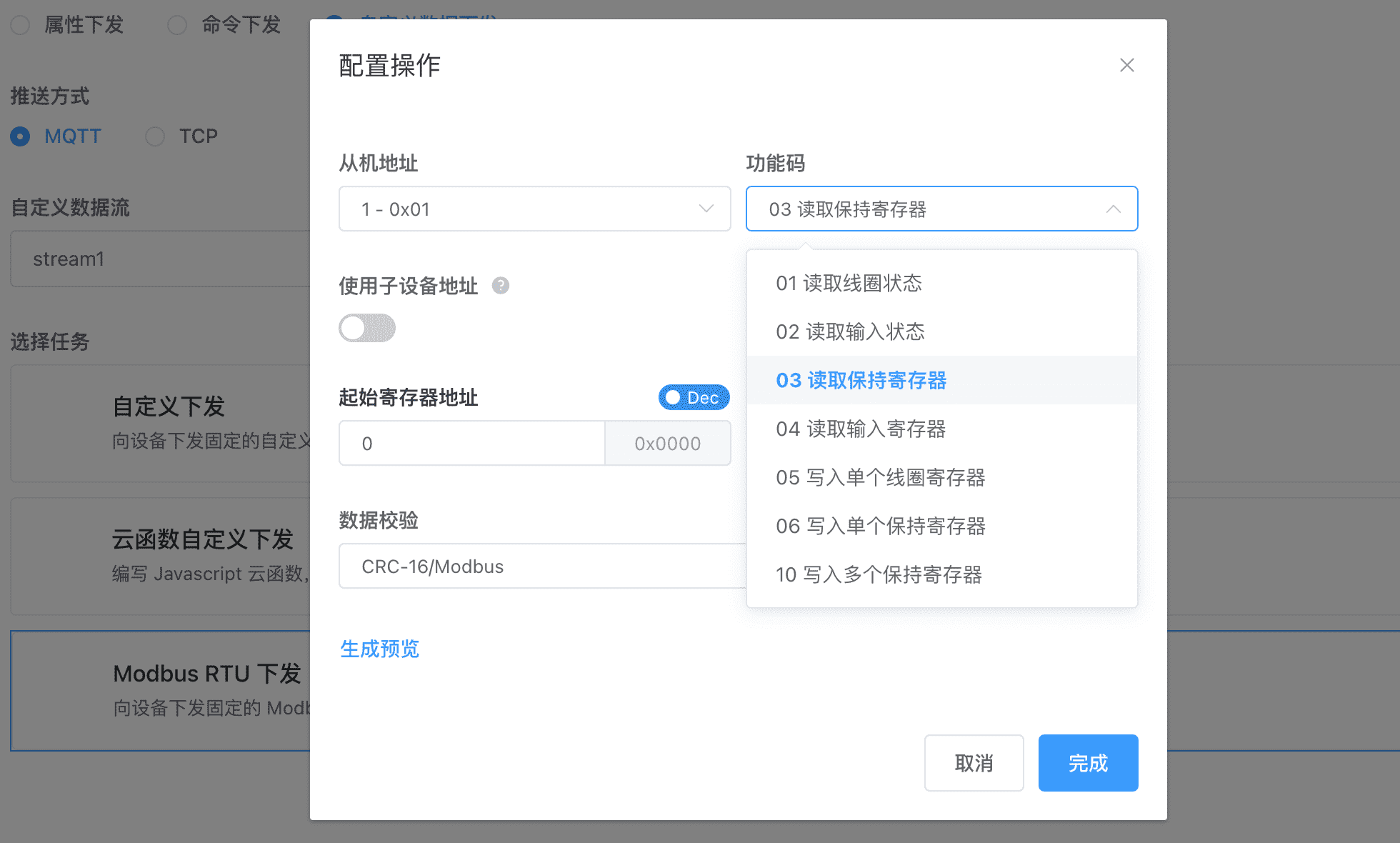
使用非常简单,可以快速生成任务,向设备(或通过 DTU 透传)下发 Modbus 查询指令,同时利用设备类型的Modbus 寄存器设置,将设备回复上报的 Modbus 报文自动解析为设备属性。
完整的配置步骤请参考 [保姆级教程] RS485/Modbus 设备通过 DTU 透传接入 ThingsCloud。
写入多个保持寄存器
对于 0x10 功能码,可以设置将多个静态数据写入指定的寄存器地址,例如:

也可以设置将设备的指定属性值,作为数据写入指定的寄存器地址,这样便可以实现和设备属性的同步,例如:
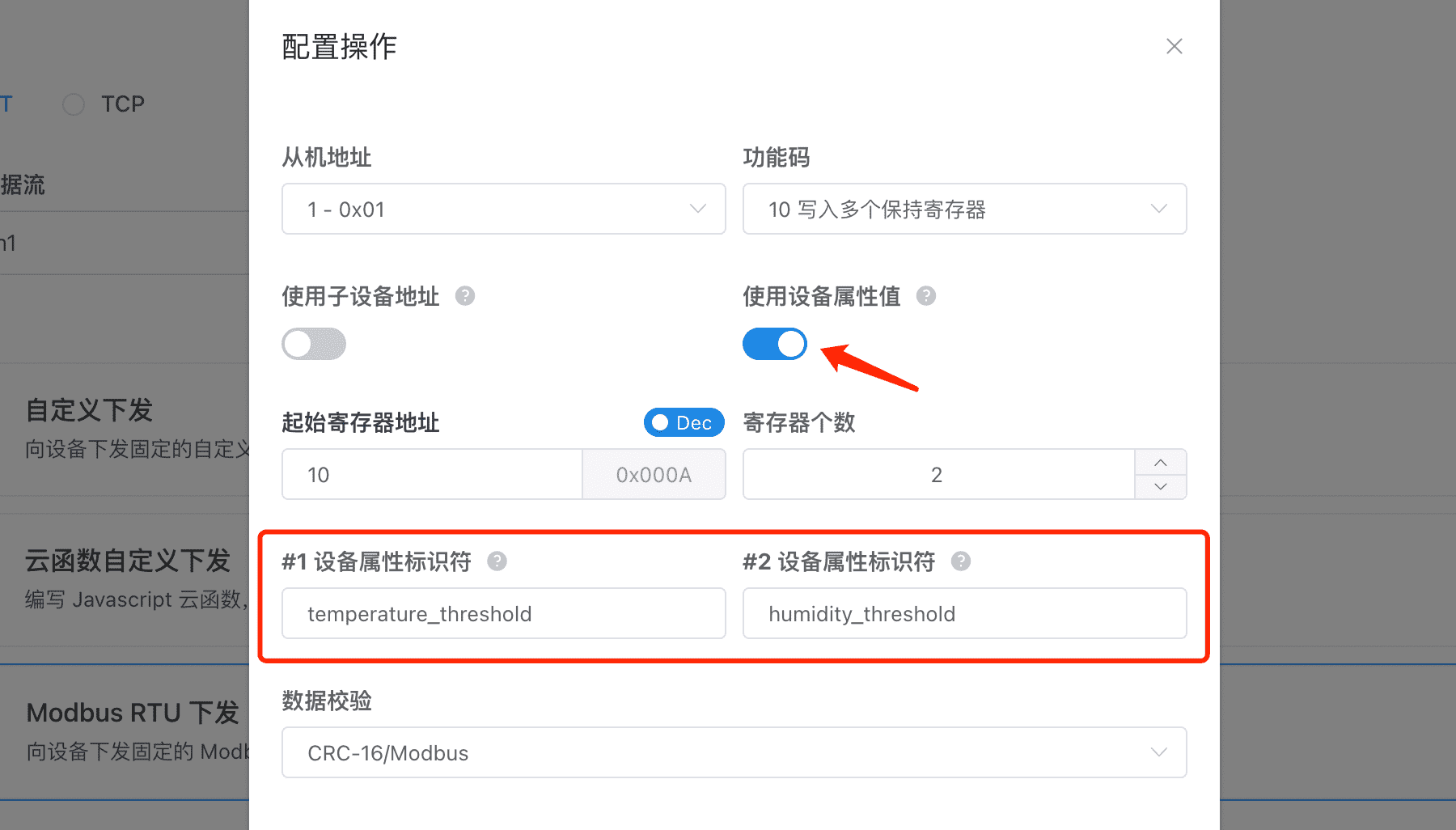
有了这样的特性,我们便可以通过 ThingsCloud 提供的通用应用软件及交互组件,快捷的更新设备属性值,然后一键下发 Modbus 指令给设备。